TCP vs UDP
Neha Chopra | Finance Writer → Full-Stack Developer in Progress I write finance case studies and analytical articles, and I’m currently transitioning into web development. Passionate about building clean, functional web experiences while bringing an analytical mindset from finance into tech.
What Are TCP and UDP? (High-Level Overview)
TCP (Transmission Control Protocol) and UDP (User Datagram Protocol) are both transport layer protocols - they sit on top of IP and provide different ways for applications to send data over the internet.
TCP is like sending a package via a premium courier service with tracking, delivery confirmation, and insurance. It establishes a connection, guarantees delivery, ensures correct order, and checks for errors. It's reliable but slower because of all these guarantees.
UDP is like shouting your message across a crowded room. You send your data out into the network and hope it arrives. There's no connection setup, no delivery guarantee, no order guarantee, and no error recovery. It's fast and lightweight but unreliable.
Both use IP to actually move packets across the network, but they provide very different services to the applications using them.
Key Differences Between TCP and UDP
| Basis | TCP | UDP |
| Connection Setup | Requires a 3-way handshake before sending any data | No connection needed. Just start sending immediately. |
| Reliability | Guaranteed delivery. If packets are lost, TCP detects it and resends them. | No guarantees. Packets can get lost. |
| Order | Data arrives in the exact order it was sent | No order guarantee. Packets might arrive out of order. |
| Error Checking | Checks for errors and corrupted data. | Has a basic checksum to detect errors, but if data is corrupted, UDP just throws it away. |
| Speed | Slower relatively | Faster relatively |
| Flow Control | Present | No flow control |
| Congestion Control | Present. TCP backs off when it detects network congestion | No congestion control present |
Use cases of TCP & UDP
TCP is used when correctness and completeness matter more than speed like for
File Downloads
Web Pages
Email
Text Messaging
Payment gateways
UDP is used when speed and low latency matter more than perfect delivery like for
Live Video Streaming
Online Gaming
Voice/Video Calls
Live Sports Broadcasts
What is HTTP and Where It Fits
HTTP (Hyper Text Transfer Protocol) is an application layer protocol that defines how web browsers and web servers communicate. It's the language of the World Wide Web.
HTTP sits above TCP in the network stack:
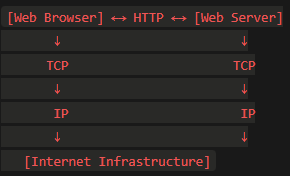
HTTP defines things like:
How to request a web page (GET request)
How to submit a form (POST request)
Status codes (200 OK, 404 Not Found, 500 Server Error)
Headers (content type, cookies, authentication)
But HTTP itself doesn't handle the actual transmission - it hands that job to TCP.
Relationship Between TCP and HTTP
Think of TCP and HTTP as different layers working together:
HTTP is the "what" - what you want to communicate:
"Give me the homepage"
"Here's a form submission"
"Send me that image"
TCP is the "how" - how the communication happens reliably:
Breaking messages into packets
Making sure they all arrive
Putting them back together
A Real Example: Loading a Web Page
When you type "www.example.com" in your browser:
Step 1 - TCP Connection:
Browser → TCP: "Establish connection to example.com server"
TCP performs 3-way handshake (SYN, SYN-ACK, ACK)
Connection established!
Step 2 - HTTP Request:
Browser → HTTP: "GET / HTTP/1.1"
HTTP → TCP: "Send this request"
TCP: Breaks request into packets, sends reliably
Step 3 - HTTP Response:
Server → HTTP: "HTTP/1.1 200 OK" + HTML content
HTTP → TCP: "Send this response"
TCP: Breaks response into packets, ensures delivery
Step 4 - Browser Receives:
TCP: Receives all packets, reassembles in order
TCP → HTTP: "Here's the complete response"
HTTP → Browser: "Here's the HTML"
Browser: Renders the web page
Step 5 - Connection Close:
TCP performs connection termination (FIN, ACK, FIN, ACK)
Why HTTP Needs TCP
HTTP needs reliable delivery because:
Web pages must be complete: Missing even one byte of HTML, CSS, or JavaScript can break the entire page.
Order matters: HTML tags must appear in the right sequence, or the page won't render correctly.
Resources are interconnected: A web page might reference images, stylesheets, and scripts - all must arrive correctly.
Forms and data: When you submit information (login, purchase, comment), it must arrive exactly as sent.
Without TCP's reliability, web browsing would be chaotic - pages would load with missing pieces, forms would fail randomly, and downloads would be corrupted.
Modern Development: HTTP/3 and QUIC
Interestingly, HTTP/3 breaks from tradition by using UDP instead of TCP. But it's not using plain UDP - it uses QUIC, which is UDP plus reliability features built at the application level.
Why? Because TCP, while reliable, has some inefficiencies:
Head-of-line blocking: If one packet is lost, TCP waits for it before delivering anything else, even if other packets arrived fine.
Slow connection setup: The 3-way handshake adds delay.
Hard to update: TCP is built into operating systems, making it hard to improve.
QUIC/HTTP/3 takes the speed of UDP and adds reliability features where needed, while avoiding some of TCP's limitations. It's the best of both worlds.
Summary
TCP is your reliable, careful friend who makes sure everything arrives perfectly, even if it takes a bit longer. Use it for web browsing, file transfers, emails, and anything where accuracy matters.
UDP is your fast, spontaneous friend who gets things done quickly but might drop the ball occasionally. Use it for gaming, live video, voice calls, and anything where speed trumps perfection.
HTTP is the language of the web, and it traditionally relies on TCP to handle the transmission. The relationship is like:
HTTP = what you want to say
TCP = making sure it's delivered reliably
Together, these protocols form the foundation of modern internet communication, each designed for specific needs and working in harmony to make the internet function smoothly!


